Ansible
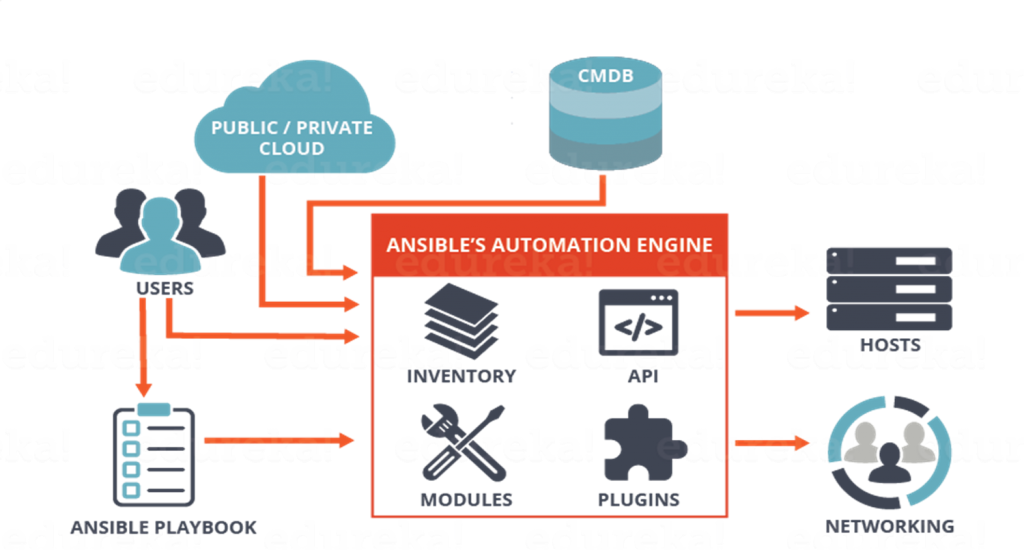
Ansible 是一个 开源 IT 自动化引擎,它被用于 应用编排 运维自动化 等场景。Ansible 是一个开源 IT 自动化引擎,可自动执行配置、配置管理、应用程序部署、编排和许多其他 IT 流程。
准备
在参阅本文档使用 Ansible 时,需要确保如下几点:
-
登录 Websoft9 控制台,然后找到(或安装)Ansible:
- 我的应用 菜单找到应用
- 应用商店 菜单部署应用
-
应用是基于 Websoft9 安装的
-
应用的用途符合 GPL-3.0 开源许可协议
-
为应用准备配置访问方式:配置域名 或 服务器安全组开启网外端口
入门指南
快速体验
在体验 Ansible 之前需准备好受控端的连接信息(IP,用户和密码),然后再开始测试:
-
Websoft9 控制台安装 Ansible 后,通过 "我的应用" 查看应用详情,进入容器的命令模式
-
运行如下几个测试命令以确认 Ansible 是否正常工作
# 查看帮助
ansible -h

# 查看系统信息
ansible localhost -m setup -
运行容器中已经存在的 test 范例
cd test

# 设置受控端连接信息
vim inventory

# 启动运行命令
ansible-playbook -i inventory playbook.yml
常用命令
ansible-playbook 是最常见的命令,也是运行程序的主要入口。
实际上,Ansible 也支持在一条命令中运行Ad-doc 使用模块,实现我们的部署目标。
# 打印本机磁盘信息
ansible localhost -m command -a 'df -h'

# 获取 facts 信息
ansible localhost -m setup

# 连通性测试
ansible all -m ping

# 本机上安装 docker-composer
ansible localhost -m get_url -a "url=https://getcomposer.org/composer-stable.phar dest=/usr/bin/composer mode=0750"
命令解释:
- localhost/all:主机名/IP/分组
- -m:指定模块(默认是command,所以可以把-m command这个去掉)
- command/setup/ping:模块名称
- -a:模块参数
- 'df -h':参数值
主机清单
Ansible Inventory (主机清单) 就是为了灵活的管理主机信息的技术标准。
下面先展示一个包含丰富信息的 hosts 文件示例:
[webservers]
86.21.14.177
web1.websoft9.com
we2.websoft9.com
192.165.2.50

[database]
86.21.14.172
host1.websoft9.com
host2.websoft9.com
192.165.2.51

[monitor]
86.21.14.173 ansible_user=root ansible_ssh_pass=123456 proxy=proxy.websoft9.com
86.21.14.174 ansible_user=root ansible_ssh_private_key_file=/root/mykey
host1.websoft9.com
www[01:50].example.com

[monitor:vars]
proxy=proxy.websoft9.com
主机清单中的变量说明:
| ansible_ssh_host | 远程主机 |
|---|---|
| ansible_ssh_port | 指定原创主机ssh端口 |
| ansible_ssh_root | ssh连接远程主机的用户 |
| ansible_ssh_pass | ssh连接远程主机的密码 |
| ansible_sudo_pass | sudo密码 |
| ansible_connection | 指定连接类型:local、ssh、paramiko |
| ansible_ssh_private_key_file | ssh连接使用的私钥 |
| ansible_shell_type | 指定连接端的shell类型,sh、csh、fish |
| ansible_python_interpreter | 指定远程主机使用的python路径 |
配置文件
Ansible 支持多个位置存放 ansible.cfg 配置文件,包括:
- ./ansible.cfg 当前工作目录下的 ansible.cfg
- ~/.ansible.cfg 当前用户家目录下的 .ansible.cfg
- /etc/ansible/ansible.cfg 安装自动产生的 ansible.cfg
- ANSIBLE_CONFIG 配置文件环境路径的环境变量
如果有多个配置文件怎么办? Ansible 有优先级原则:环境变量 > 当前工作目录 > 用户家目录 > etc
下面是常用的配置项:
| 项 | 说明 | 示例 |
|---|---|---|
| log_path | 日志文件地址,Ansible 默认不记录日志,需自定义 | log_path = /var/log/ansible.log |
| inventory | 资源清单(主机列表)文件位置 | inventory = /etc/ansible/hosts |
| library | 模块目录,有默认值 | library = /usr/share/ansible |
| forks | 工作进程最大值,默认值为 5 | forks = 10 |
| sudo_user | 设置运行 Ansible 程序的默认用户 | sudo_user = root |
| remote_port | 远程主机的端口,用于连接被管理主机,默认值为 22 | remote_port = 22 |
| host_key_checking | 是否检查 SSH 主机的秘钥,默认为 True。适用于同一台被管理主机秘钥发生变化的错误提示,如果不希望出现这种提示,可以设置本项为 False | host_key_checking = False |
| timeout | 设置连接远程主机的 SSH 超时时间 | timeout = 60 |
配置选项
- Ansible 配置文件: /etc/ansible/ansible.cfg
- Ansible 示例目录: /ansible/project
- 版本:
ansible --version - 环境变量:以 ANSIBLE_ 开头的环境变量与 ansible.cfg 有对应关系。例如:export ANSIBLE_SUDO_USER=root
- Ansible 可视化工具:Red Hat Ansible Automation Platform
- 命令行:
- ansible:主命令
- ansible-config:配置文件和配置项修改
- ansible-console:交互式运行 ansible 命令
- ansible-doc:查询文档
- ansible-galaxy:galaxy 项目库发布与下载
- ansible-inventory:主机清单管理
- ansible-playbook:运行 playbook 程序
- ansible-pull:拉取并运行 playbook 程序
- ansible-vault:加密处理
管理维护
问题与故障
python-urllib3 报错?
python-urllib3 报错大部分情况下,通过 yum install python-urllib3 解决,而不是 pip install
账号准确,仍无法连接受控机?
清空服务器中的 /root/.ssh/known_hosts 文件
Ansible 是否支持动态主机清单?
支持。由于在实际生产场景中,如果清单采用手动维护这些列表将是一个非常繁琐的任务。
Ansible 支持动态生产主机清单,即 ansible.cfg 指向一个生产主机清单的程序,再由程序产生符合格式的清单列表。
Ansible 有没有默认分组?
有。默认有包含文件所有主机的 all 组,同时还有没有归属的 ungrouped 组。
Ansible 变量优先级有哪些?
有高到低:ansible命令带入的变量 > cfg配置文件的变量 > 主项目的var变量 > role中的var变量 > role default 变量
Ansible 有全局变量的概念吗?
没有
客户端和服务端 Python 版本一致?
可以
Ansible 有哪些内置变量?
Ansible 有三种类型的内置变量:
- 用于 ansible.cfg 配置的系统变量(环境变量)
- 用于工作过程的特殊变量
- 收集到受控端的 Facts 变量